Use a Course Information and Guidelines Template
This template helps to provide clear course information and guidelines in alignment with NC State Regulations. This template also helps to meet some of the standards of Quality Matters Higher Education Rubric, 7th Edition.
In this article
Make a copy of the template
Follow these steps to make an editable copy of the template for your own use.
- Make sure you log into Google with your NC State account.
- Access the Course Information and Guidelines Template Google Doc.
- Click File from the top menu.
- Select Make a Copy.
- Name your file.
- Select a Folder in “My Drive” to save the copy to.
- Click the Make a Copy button.
You may now edit your copy of the template to reflect your own course.
Best practices
- Use welcoming language and a conversational tone to help make this document personal and inviting for students.
- Delete the brackets [ ] and any associated text and replace with information relevant to your course.
- Words in italics and yellow highlight represent instructions. Remember to delete all italics and highlighted text.
- Examples are provided. You can edit/copy or customize the language for your course.
- Do not change headings or subheadings. This formatting meets accessibility requirements.
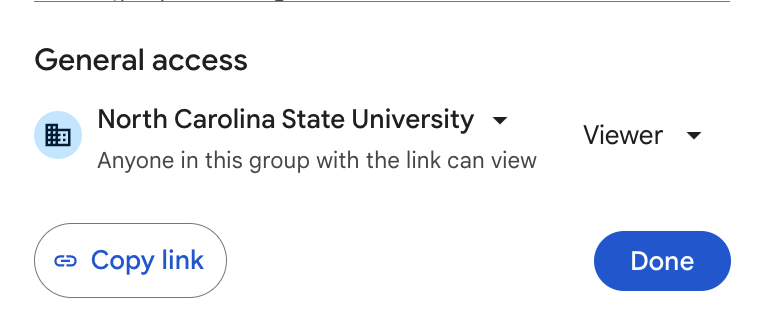
Set Viewing Permission
- Select the Share button at the top right corner of the Google Doc screen.
- In the pop-up under “General access,” click on the first dropdown and select North Carolina State University.
- Click on the second dropdown and select Viewer.
- Click Done.