Use a Welcome Letter Template
Sending a welcome letter that gives students necessary information and resources to get started, to students before class begins will help build a sense of community. This article will discuss how to create a welcome letter to help students feel more comfortable and connected to the course.
In this article
Access the template
Follow these steps to make an editable copy of the template for your own use.
- Make sure you log into Google with your NC State account.
- Access the Welcome Letter Template Google Doc.
- Click File from the top menu.
- Select Make a Copy.
- Name your file.
- Select a Folder in “My Drive” to save the copy to.
- Click the Make a Copy button.
You may now edit your copy of the template to reflect your own course.
Best practices
- Use welcoming language and conversational tone to help make this document personal and inviting for students.
- Provide clear instructions for how to get started in the course.
- Provide contact information and how best to contact you.
- Send your welcome letter out 5-7 days before the course begins.
- Post your welcome letter in the Start Here area of your course.
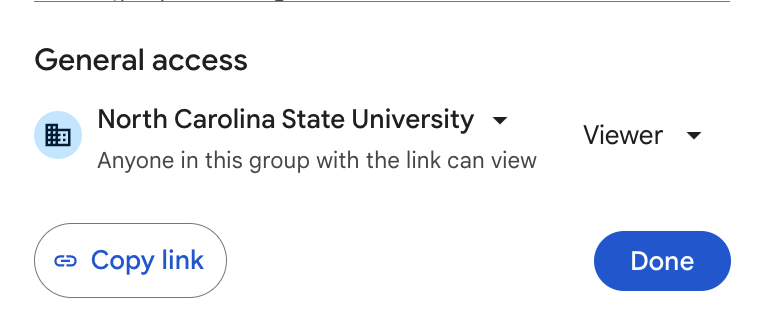
Set Viewing Permission
- Select the Share button at the top right corner of the Google Doc screen.
- In the popup under “General access,” click on the first dropdown and select North Carolina State University.
- Click on the second dropdown and select Viewer.
- Click Done.
Examples
View an example welcome letter from ENG 331.
Watch a video walkthrough of an example welcome letter. (1:43)
Resources
WolfSNAPS: Setting Up for Success – Register for this short self-paced training